


Royal Caribbean International
4.729.07K Reviews
App Specs
- Version
- 1.81.0
- Updated On
- License
- Free
- Downloads
- 5,000,000+
- Developer
- Royal Caribbean Cruises Ltd.
- Categories
- Travel & Local
- Platform
- Android, iOS
Screenshots

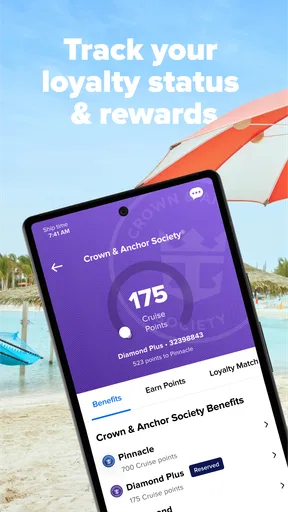
 Analysis by AppCompare
Are you ready to set sail on a digital adventure without even leaving your couch? Let me introduce you to the Royal Caribbean International app, your ultimate companion for cruising the high seas in style. I’ve given it a whirl and here’s the lowdown on what you can expect.
Setting Sail: Getting Started with the App
First things first, downloading the Royal Caribbean International app is a breeze. Whether you’re an Android aficionado or an iOS enthusiast, just hit up your app store and you’re good to go. Once installed, the app greets you with a sleek interface that's almost as inviting as a real cruise ship.
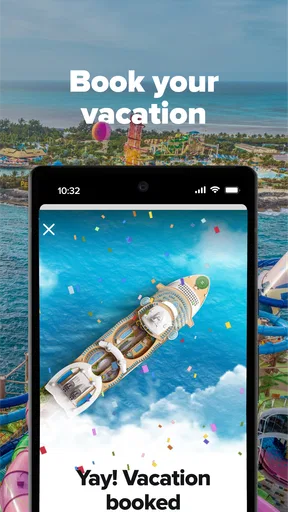
Logging in is straightforward, especially if you’ve already booked a cruise. Just use your reservation details and voilà, you’re in! Don’t worry if you’re still dreaming of your next vacation; the app lets you explore itineraries and ship features to get your wanderlust going.
What the Free Download Does—and Doesn’t Mean
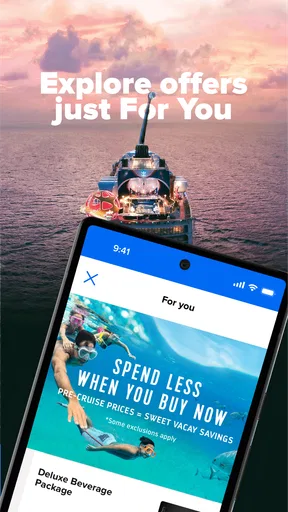
The app is free, which makes it easy to install before deciding whether it fits your travel plans. I see that as useful access rather than a promise that every cruise activity or service inside the app is free. The app can help you browse and organize choices, while reservations, excursions, dining, and connectivity may involve separate cruise costs. I would check the terms and prices for any specific purchase before committing, rather than treating the free download as an all-inclusive vacation pass.
That distinction matters most when you’re planning a group trip. You can use the app to look at options together, but a screen showing an activity or restaurant should not be read as proof that it is included in your fare. I’d use it to shortlist what appeals to everyone, then verify the cost and availability for your particular sailing before building the budget around it.
A Useful Planning Tool, Not a Substitute for Every Travel App
In the wider travel-and-local category, many apps are built around broad destination discovery, mapping, or comparing travel choices. This one has a narrower purpose: it connects the planning and onboard experience to a Royal Caribbean cruise. That focus is its value. Instead of making a general itinerary for a city, it keeps cruise-related details such as activities, dining, excursions, and the ship’s daily schedule in one place.
I wouldn’t replace a general map or a destination research app with it. Those are still better when you want independent directions, broad local recommendations, or information that is not tied to your sailing. I’d use this app for cruise-specific decisions and keep general travel tools for getting to the port, exploring independently, or researching a destination beyond the cruise’s own options.
Worth Reading Before You Choose

EA SPORTS FC Mobile 26 Is a Bigger Football Game, but It Takes Time

Flipboard Shows What News Apps Must Do Beyond the Feed

Switching to Android Auto Means Rethinking Your Driving Routine

Google Calendar Makes a Crowded Week Easier to Manage

Ludo King Makes the Most of the Minutes Between Plans

Baby Panda World Brings Quick Play to Modern Phones, but Its Game Library Feels Busy
The app is made by Royal Caribbean Cruises Ltd., and that connection is both the point and the limitation. Its information is relevant to the cruise line’s ships and services, but it is not a neutral comparison tool for every cruise operator. If you are choosing between different companies, I’d compare their offerings separately rather than expect this app to help make that decision.
Small Planning Habits That Make It More Useful
One practical approach is to check the itinerary and ship information before making a long list of activities. That way, you can plan around the actual sailing rather than get attached to an option that may not fit your trip. I’d also review the daily calendar each morning onboard and pick only a few priorities; trying to treat every listed event as a commitment can turn a relaxing day into a timetable.
For dining, I’d decide which meals matter enough to reserve and leave some room for flexibility. The app can help you explore menus and make reservations, but a reservation is a plan, not a reason to over-schedule every evening. If your group has different preferences, checking the options together before booking can prevent the familiar problem of one person choosing a restaurant nobody else wanted.
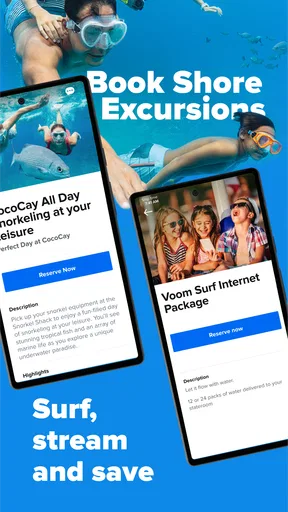
For excursions, the useful workflow is to compare the ship’s choices with what you actually want from a port day. An organized excursion may suit someone who values a planned outing, while an independent traveler may prefer to research the destination separately. The app is helpful for seeing cruise-linked options; it cannot decide which pace or style is right for you.
Who Gets the Most Value from It?
I’d recommend installing it if you already have a Royal Caribbean sailing booked, especially if you like to keep reservations and daily plans organized on your phone. It can also be handy for a first-time cruiser who wants to understand the ship’s activities before boarding. With a 4.6 average from around 131,000 ratings and more than 5 million installs, it has clearly reached a large audience, though those figures alone can’t tell you whether its tools suit your particular trip.
It is less compelling if you are not considering a Royal Caribbean cruise, or if you want one app to plan every part of a multi-company trip. In that situation, a general travel planner is likely to be more useful day to day. I would still consider installing this one if I were comparing cruise options, but I wouldn’t expect it to organize unrelated hotels, transport, and activities as a complete travel hub.
A Realistic Day with the App
Imagine you have a sea day with several activities you might enjoy and a dinner reservation to keep. I’d open the calendar over breakfast, choose one event that is a priority, and note the time needed to get there rather than stacking the whole day with plans. Later, I’d check the dining details before heading to dinner. This is where the app’s focused layout can be more convenient than searching through messages, printed schedules, and separate notes.
The trade-off is that a phone-based plan is only helpful if you remember to check it. I’d make the morning calendar check part of the routine, then keep some unscheduled time. If you prefer not to use your phone while on vacation, a paper note or the ship’s own notices may suit you better; the app should reduce friction, not become another thing you feel obliged to monitor.
Practical Expectations Before You Board
People often want to know whether the app is useful before booking, whether it replaces other travel tools, and whether installing it guarantees access to everything shown. My view is that it can be worth exploring before a trip because it gives you a feel for cruise-related planning, but its strongest role is for someone with a sailing to organize. It complements rather than replaces general travel tools, and the free download does not make every listed service complimentary.
It is also sensible to check the app while you have a reliable connection before travel, especially if you need to sign in or review arrangements. I wouldn’t leave a first login or important planning task until the moment you need it. This is a simple precaution for any travel app, and it matters when you are coordinating plans with other people and want time to sort out reservation details.
Navigating the Digital Decks
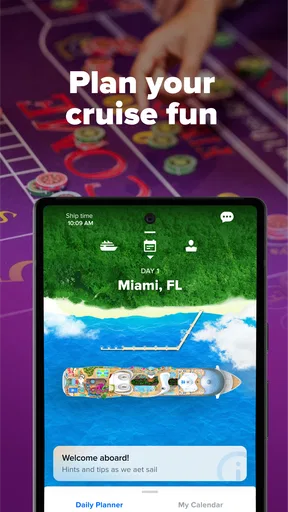
One of the first things that caught my eye is how intuitive the navigation is. The app is organized into several key sections: Plan My Cruise, Onboard Activities, Dining, and Excursions. Each section is a treasure trove of information waiting to be explored.
Need to check your itinerary or make a dining reservation? It’s all right there at your fingertips. The app’s interface is as smooth as a calm sea, making it easy to find exactly what you’re looking for without any hassle.
Plan Ahead: Excursions and Activities
Now, let’s talk about the fun stuff—excursions and activities! The app gives you a sneak peek into all the incredible experiences you can enjoy on and off the ship. Whether it’s zip-lining in Labadee or exploring the vibrant streets of Cozumel, planning your dream adventure is just a tap away.
For those who love spontaneity, the app also highlights daily activities and events happening on board, so you can always find something exciting to do. It’s like having your own personal cruise director in your pocket, ready to guide you to the next memorable experience.
Stay Connected: Making the Most of Onboard Features
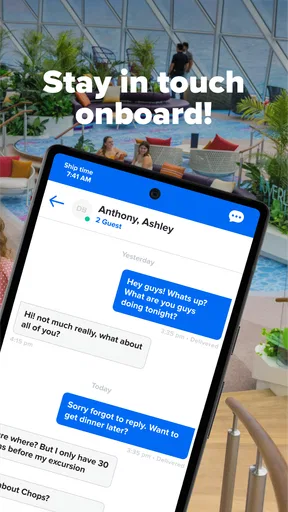
Staying connected at sea has never been easier. The app offers a chat feature that lets you keep in touch with your travel companions without having to rely on pricey international texting. Plus, with the ship’s Wi-Fi packages, you can share your vacation snaps with friends and family back home in real-time.
Another nifty feature is the daily calendar, which keeps you up-to-date with all the onboard happenings. From Broadway-style shows to poolside parties, you’ll never miss out on the action. It’s like having a digital cruise compass that ensures you’re always in the know.
Dining Delights: Booking and Exploring Culinary Options
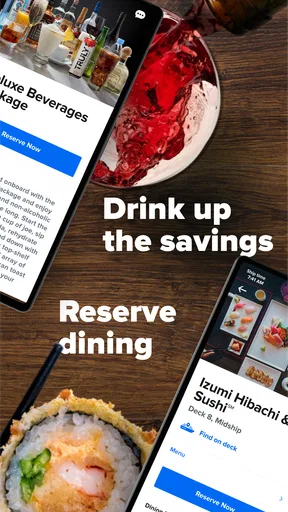
No cruise is complete without indulging in some delicious dining experiences, and the app makes it easy to explore all the options. You can make reservations for specialty restaurants, check out menus, and even prepay for your meals. Trust me, the variety is mouth-watering, and having everything organized in one place takes the stress out of decision-making.
Feeling adventurous? The app’s dining section also offers a glimpse into themed nights and culinary events that are sure to tantalize your taste buds. Whether you’re craving sushi, steak, or something sweet, the app makes sure your dining experience is nothing short of spectacular.
Smooth Sailing: Final Thoughts
All in all, the Royal Caribbean International app is a fantastic tool that enhances your cruising experience from start to finish. It’s user-friendly, packed with useful features, and genuinely makes your vacation more enjoyable.
Whether you’re planning your next trip or already on board, this app is a must-have for any cruise enthusiast. So, download it, kick back, and get ready to embark on an unforgettable adventure!
Pros
- User-friendly interface enhances navigation.
- In-depth itinerary details for planning trips.
- Real-time updates on ship activities.
- Easy access to dining and entertainment options.
- Seamless integration with personal calendars.
Cons
- Requires constant internet connection.
- Limited offline functionality.
- Occasional app crashes reported.
- Some features need frequent updates.
- In-app purchases can add up.
FAQs for Royal Caribbean International
What features does the Royal Caribbean International app offer?
The Royal Caribbean International app provides a comprehensive suite of features to enhance your cruise experience. Users can access daily itineraries, make dining and entertainment reservations, check-in online, and even explore deck maps. The app also offers real-time updates on activities and allows for easy communication with onboard services.
Is the Royal Caribbean app available for both Android and iOS devices?
Yes, the Royal Caribbean International app is available for download on both Android and iOS platforms. It can be found on the Google Play Store for Android users and the Apple App Store for iOS users, ensuring accessibility for a wide range of mobile devices.
Do I need an internet connection to use the Royal Caribbean app onboard?
The Royal Caribbean app is designed to work offline with many of its features like viewing itineraries and maps. However, for real-time updates and messaging services, an internet connection is required. The ship offers Wi-Fi packages that can be purchased to stay connected during your cruise.
Can I use the Royal Caribbean app to book excursions and other activities?
Absolutely! The app allows you to book shore excursions, specialty dining, and entertainment options right from your mobile device. This feature helps ensure you don’t miss out on popular activities and allows for a seamless planning experience both before and during your cruise.
Is my personal information secure on the Royal Caribbean app?
Royal Caribbean places a high priority on user security. The app employs encryption and other security measures to protect personal data. It's important to keep your app updated to the latest version to benefit from ongoing security enhancements and to review the app’s privacy policy for more detailed information.


